
Prove presence.
Respect privacy.
A live, privacy-respecting view of user and device activity across your entire Windows fleet — presence, activity levels, and usage patterns down to the minute. No keystrokes, no screenshots, no message content.
Presence, not surveillance.
MunkiSee answers "is this user working right now?" clearly and in real time without viewing or capturing anything on screen.
Real-time presence
See who is active across every device and location, updated every 5 minutes.
Multi-tenant for MSPs
Manage every customer environment from one portal and switch between them without logging out. Tenant data stays isolated. Available on Professional and Enterprise.
Automated input detection
Flags the input patterns of mouse jigglers and auto-clickers, when "active" may not mean a real person.
Full session timelines
Replay a device's day as active, idle, and offline periods. Useful for support, not surveillance.
Usage analytics
Trends by team, device model, and site. Find idle kiosks, underused devices, fleets due for replacement.
Silent deployment
Intune, SCCM, or a single command line across the whole fleet.
The tray icon never lies.
The client's system tray icon always reflects real status, so nobody has to guess whether they're being tracked. Watch it change as the day plays through.
- —The agent always runs in the background; it never fully shuts down.
- —Tracking is only active during hours you define, at org, team, or individual level.
- —Outside those hours nothing is recorded at all - by design.
- —If connection to the server is lost, the agent stores activity logs locally and securely, and syncs back to the server when the connection is restored.



A terminal that sits idle all week and one running flat out cost exactly the same to own. Refresh cycles, licence counts and shift cover all get planned on numbers nobody has measured.
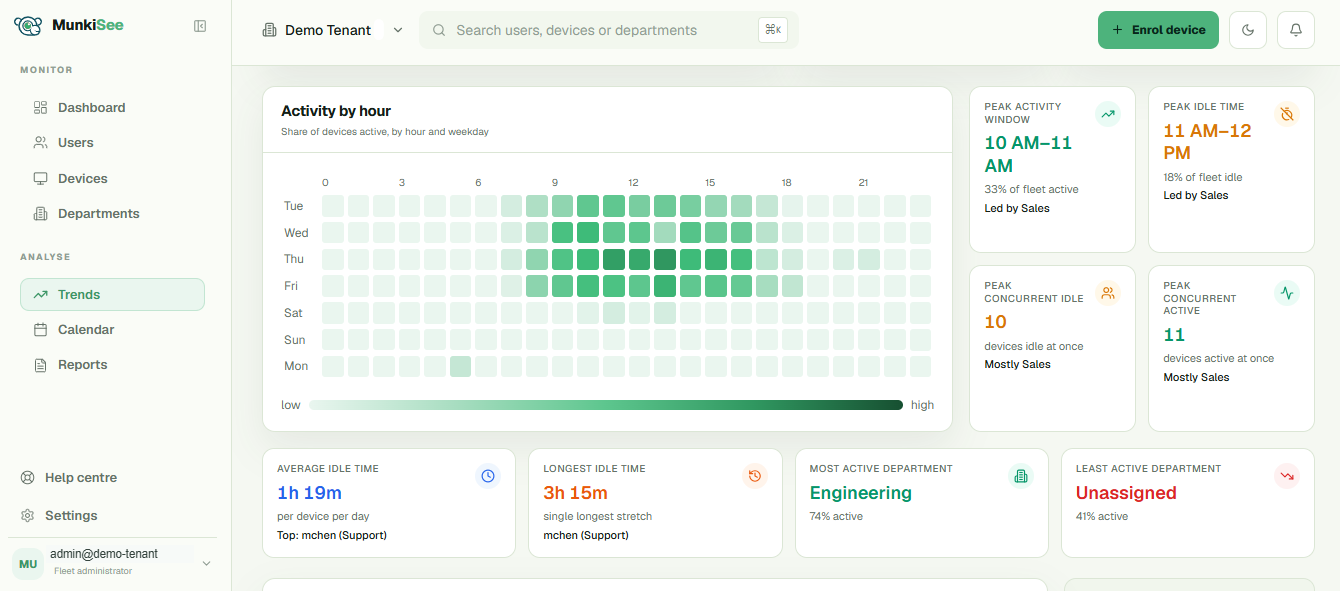
Every hour, every device, one view.
See exactly when your fleet is actually working, so staffing, shift scheduling, and maintenance windows stop being a guess.
One dashboard, wherever you run it.
Managed cloud or Enterprise self-hosted, every plan gets the same MunkiSee dashboard. Hover the markers to see what each part does.
Simple per-seat pricing. Suited to your fleet.
Core, Standard, and Professional are fully managed in the cloud. Need self-hosted installers on your own infrastructure, or a custom cloud arrangement? That's Enterprise — custom-quoted, available either way.
Core
The full measurement product: presence, timelines, trends, teams and reporting.
- ✓Real-time presence & idle status
- ✓Activity timelines & heatmaps
- ✓Activity trends
- ✓Scoped business hours
- ✓CSV & PDF report export
- ✓Device approval queue
- ✓Custom teams and departments
- ✓Multiple admin accounts
- ✓90 days of cloud activity history
- ✓Email support
Standard
Adds sign-on and scheduling — SSO, calendar, scheduled reports and the automation check.
- ✓Everything in Core
- ✓Single Sign-On (SSO)
- ✓Calendar and scheduling
- ✓Scheduled reports
- ✓Suspicious activity detection
- ✓180 days of cloud activity history
- ✓Priority support
Professional
Adds integration and compliance — API access and self-service data removal.
- ✓Everything in Standard
- ✓1 year of cloud activity history
- ✓API access
- ✓Self-service data removal
- ✓Dedicated account contact
Enterprise
Full control over deployment, retention and contract terms.
- ✓Everything in Professional
- ✓Self-hosted installers, or managed cloud
- ✓SIEM audit-log forwarding
- ✓MCP server for AI assistants
- ✓Full data exports
- ✓Unlimited retention on self-hosted; 5 years in cloud
- ✓Dedicated account manager, SLA-backed
Deploy it your way.
Core, Standard, and Professional are fully managed in the cloud. Enterprise can be managed in the cloud too — or self-hosted entirely on your own infrastructure.
Cloud-hosted
Included on Core, Standard, and Professional. Nothing to install or patch — point your agents at us and you're monitoring in minutes.
- ✓Nothing to install, patch, or maintain
- ✓Hosted dashboard, reachable from anywhere
- ✓Automatic updates, no maintenance windows
- ✓Tiered activity retention by plan
Self-hosted
Run MunkiSee on-prem, in your datacenter, or on a cloud VM you control. Activity data never leaves your infrastructure.
- ✓Your infrastructure, your control
- ✓MCP server access for AI assistants
- ✓Unlimited retention on self-hosted; 5 years in cloud
- ✓You control upgrades, backups, network access
AI-powered fleet queries.
MCP-compatible assistants can query your fleet directly — the same data behind the dashboard, exposed as tools an assistant can call on its own. Available on Enterprise, self-hosted or managed cloud. See the MCP documentation.
 Claude
 ChatGPT
 Gemini
 Ollama
 Cursor
 Copilot
↵
Copilot
↵
Frequently asked questions.
What’s the difference between self-hosted and cloud-hosted?
Can I add or remove seats as my fleet changes?
What data does MunkiSee actually collect?
Does the free trial include every feature?
Can I switch between monthly and annual billing?
What happens to my data after retention expires?
Start seeing your fleet in real time.
14-day free trial, self-hosted or managed. No credit card, no agent creepiness.